
Introduction
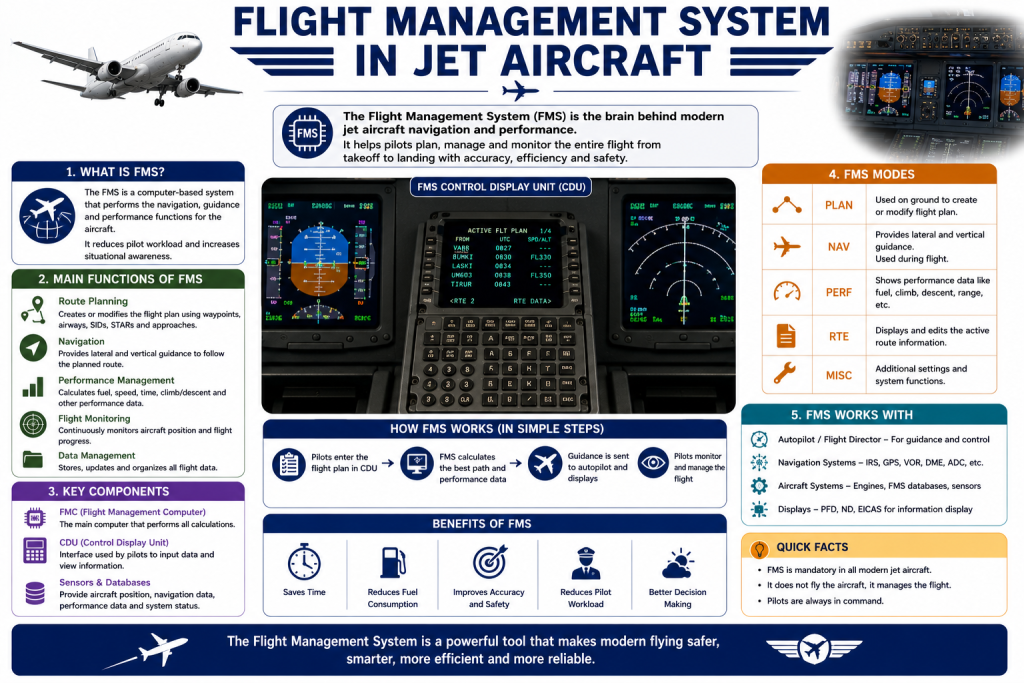
Modern jet aircraft rely on a wide range of avionics systems to help pilots manage navigation, flight planning, aircraft performance, and changing flight conditions. One of the most important systems in this environment is the Flight Management System, commonly known as the FMS.
The FMS brings together information from different aircraft systems and navigation sources to help the flight crew plan and manage a flight. Depending on the aircraft, it can assist with route management, navigation, performance calculations, fuel predictions, and vertical and lateral guidance.
Although the FMS can automate many tasks, it does not replace the pilot. Flight crews remain responsible for entering and verifying information, monitoring the aircraft’s behavior, checking system outputs, and responding appropriately when conditions change.
Understanding how an FMS works is therefore an important part of learning about modern jet-aircraft operations.
What Is a Flight Management System?
A Flight Management System is an integrated avionics system designed to support various aspects of flight planning, navigation, and performance management.
At its core, an FMS helps pilots manage a programmed flight route and provides information or guidance that can be used by other aircraft systems.
Depending on the aircraft and installed avionics, an FMS may support:
- Flight-plan management
- Area navigation
- Navigation database use
- Performance calculations
- Fuel predictions
- Lateral navigation
- Vertical navigation
- Route modifications
- Navigation monitoring
- Estimated time calculations
The exact functions and interface differ between aircraft types and avionics installations.
Why FMS Is Important in Jet Aircraft
Jet aircraft often operate over long distances and through complex airspace. Pilots may need to manage numerous waypoints, airways, departure procedures, arrival procedures, altitude restrictions, speed restrictions, and changes issued by air traffic control.
An FMS helps organize much of this information within an integrated system.
It can help pilots:
- Build and modify flight plans
- Manage complex navigation routes
- Reduce repetitive manual calculations
- Monitor estimated fuel and arrival information
- Support departure and arrival procedures
- Provide navigation guidance
- Coordinate information with other aircraft systems
The main advantage is integration. Instead of managing every navigation task separately, pilots can use a centralized system to organize much of the information required during a flight.
However, automation does not eliminate the need for pilot involvement. The crew must continue to verify that the programmed information and resulting guidance are correct.
Main Components of a Flight Management System
Flight Management Computer
The Flight Management Computer, often referred to as the FMC in some aircraft, is the computing element responsible for processing flight-management information.
It may process information related to:
- Flight routes
- Aircraft position
- Navigation
- Performance
- Fuel
- Flight-plan data
- Aircraft-system inputs
Some jet aircraft use multiple flight-management computers to provide redundancy and improve system reliability.
Control and Display Unit
Pilots need an interface through which they can enter, modify, and review flight information.
Depending on the aircraft, this interface may be a:
- Control Display Unit
- Multifunction control display
- Touchscreen interface
- Integrated avionics display
Pilots can use the interface to enter routes, select procedures, review calculations, modify waypoints, and access different FMS functions.
The layout and terminology can vary considerably between aircraft.
Navigation Database
The navigation database contains information used for flight planning and navigation.
Depending on the system, it may contain:
- Airports
- Runways
- Waypoints
- Airways
- Instrument departure procedures
- Arrival procedures
- Approaches
- Navigation facilities
Navigation information changes over time, which is why databases need regular updates.
Pilots must ensure that the applicable database is being used and verify programmed information against the appropriate operational references and clearance.
Navigation Sensors and Inputs
An FMS can receive information from several navigation and aircraft systems.
Depending on aircraft configuration, sources can include:
- GNSS or GPS
- Inertial reference systems
- Radio navigation systems
- Air data systems
- Heading information
- Aircraft position data
The system can use available information to calculate and update aircraft position.
How an FMS Determines Aircraft Position
Aircraft navigation can rely on several different sources.
An FMS may combine information from satellite navigation, inertial systems, radio navigation, and other aircraft sensors to establish or update the aircraft’s position.
For example, an inertial reference system can provide information about movement and position changes, while satellite-based navigation can provide highly accurate position information when available.
The exact method of position determination depends on the aircraft’s avionics architecture.
The important point is that the FMS does not simply display a position from one universal source. It can use information from different systems to support navigation and flight management.
How Flight Planning Works Through an FMS
One of the most visible uses of an FMS is flight-plan management.
A general flight-plan setup may involve the following steps:
- Enter the departure airport.
- Enter the destination.
- Enter the planned route.
- Add waypoints or airways as required.
- Select applicable departure and arrival procedures.
- Review the route for errors or discontinuities.
- Check restrictions and important navigation information.
- Compare the programmed route with the assigned clearance.
- Activate the appropriate route when required.
The exact procedure depends on the aircraft.
The important principle is that pilots should verify the flight plan rather than simply accepting whatever appears on the display.
An incorrect waypoint, procedure, or route entry can result in incorrect navigation guidance.
Lateral Navigation
Lateral navigation refers to managing the aircraft’s horizontal path.
An FMS can provide guidance based on the programmed route, which may contain:
- Waypoints
- Airways
- Tracks
- Course changes
- Departure procedures
- Arrival procedures
- Approach procedures
The system can calculate the desired path between programmed points and provide navigation guidance.
Depending on the aircraft, this guidance may be displayed on the navigation display and made available to the flight-guidance system.
Pilots must still monitor the aircraft’s actual position and confirm that it is following the intended route.
Vertical Navigation
Vertical navigation involves managing the aircraft’s vertical flight profile.
Depending on the FMS, vertical-navigation functions may assist with:
- Climb planning
- Cruise management
- Descent planning
- Altitude restrictions
- Speed restrictions
- Vertical paths
A vertical profile can help the aircraft plan how to move from one altitude to another while considering programmed restrictions and aircraft performance.
However, vertical guidance must be monitored carefully. Pilots are still responsible for complying with air traffic control instructions and verifying altitude and speed restrictions.
FMS and Autopilot: What Is the Difference?
The Flight Management System and autopilot are related but perform different functions.
| Feature | Flight Management System | Autopilot |
|---|---|---|
| Main purpose | Flight planning and navigation management | Aircraft flight-control guidance |
| Route management | Yes | Not its primary function |
| Navigation database | Uses navigation database | Not normally the primary database manager |
| Performance calculations | Often supported | Not its primary role |
| Aircraft control | Provides navigation or guidance information | Controls aircraft according to selected modes |
| Flight-plan modification | Yes | Not normally |
| Pilot monitoring | Required | Required |
In many modern jet aircraft, the FMS can provide navigation guidance to the flight-guidance system. The autopilot may then use that guidance to control the aircraft.
This does not mean the FMS itself is the autopilot.
The distinction is important because pilots need to understand which system is calculating the route and which system is actually controlling the aircraft.
How FMS Works With Other Aircraft Systems
An FMS is part of a larger avionics environment rather than an isolated computer.
Autopilot and Flight Director
The FMS can provide lateral or vertical navigation guidance that may be used by the flight director or autopilot.
The exact interaction depends on the aircraft.
Primary Flight Display
Flight information and guidance cues may be presented to pilots through the primary flight displays.
This allows the crew to monitor important information while flying the aircraft.
Navigation Display
The navigation display can show information such as:
- Aircraft position
- Programmed route
- Waypoints
- Navigation data
- Heading and track information
This provides pilots with a visual representation of the planned and actual flight path.
Autothrottle or Autothrust
Some jet aircraft integrate performance and speed-management functions with an autothrottle or autothrust system.
This can help manage aircraft speed according to the selected or calculated flight profile.
The specific functions available depend on aircraft design and avionics configuration.
FMS Performance Management
Many modern FMS installations provide performance-management functions.
These can support calculations related to:
- Takeoff performance
- Climb
- Cruise
- Descent
- Fuel predictions
- Estimated time of arrival
- Aircraft weight
Performance information depends on the quality of the inputs and the aircraft-specific data available to the system.
For example, incorrect aircraft weight or fuel information can affect calculated predictions.
Pilots therefore need to enter accurate information and review the resulting values.
FMS and Fuel Management
Fuel planning is another important area in which an FMS can assist the flight crew.
Depending on the aircraft, the system may provide information such as:
- Estimated fuel remaining
- Predicted fuel at destination
- Fuel predictions at waypoints
- Estimated arrival fuel
- Time-related fuel information
These calculations depend on factors such as aircraft performance, route, wind, altitude, speed, and fuel inputs.
FMS fuel predictions should therefore be monitored throughout the flight rather than treated as permanently fixed values.
Changes in weather, routing, aircraft performance, or air traffic restrictions can change the expected fuel situation.
FMS During Different Phases of Flight
Pre-Flight
Before departure, pilots may use the FMS to:
- Enter the flight plan
- Select procedures
- Review the route
- Enter performance information
- Check navigation data
- Review fuel predictions
The programmed information should be checked against the flight clearance and applicable navigation references.
Takeoff and Departure
During departure, the FMS may support the programmed departure procedure and provide navigation guidance.
Pilots monitor the flight path and ensure that the aircraft is following the intended procedure.
Climb
During climb, the FMS can assist with route management and, where available, vertical-navigation guidance.
The system can help manage waypoints, altitude restrictions, speed information, and the planned route.
Cruise
During cruise, pilots may use the FMS to monitor:
- Route progress
- Aircraft position
- Fuel predictions
- Estimated arrival time
- Navigation information
- Possible route changes
The system can also assist when the flight plan needs to be modified.
Descent
During descent, the FMS may help calculate and manage a planned vertical profile.
It can also support arrival-route management and provide information about altitude and speed restrictions.
Pilots must verify that the resulting profile is appropriate for the actual clearance and conditions.
Approach
Depending on aircraft capability and operational approval, the FMS may support certain instrument approaches.
Pilots must select and verify the appropriate procedure and ensure that the aircraft’s navigation capability is suitable for the intended operation.
Missed Approach
A missed-approach procedure may be stored within the navigation database when applicable.
However, pilots must verify the procedure and execute it according to aircraft procedures and air traffic control instructions.
FMS Navigation Database and Updates
Navigation databases are an important part of FMS operation.
They can contain information that changes over time, including:
- Runway information
- Waypoints
- Airways
- Departure procedures
- Arrival procedures
- Approach procedures
- Navigation facilities
Because this information can change, databases are updated periodically.
Using an outdated or inappropriate database can create operational problems.
Flight crews therefore need to ensure that the correct database is installed and available for the operation.
Common FMS Inputs
The FMS relies on accurate information.
Depending on the aircraft, pilots may enter information such as:
- Flight number
- Departure airport
- Destination
- Route
- Waypoints
- Altitudes
- Aircraft weight
- Fuel
- Performance parameters
- Other aircraft-specific data
Incorrect entries can affect the flight plan, navigation guidance, performance calculations, or fuel predictions.
This is why pilots are trained to verify important entries rather than assuming that every displayed value is correct.
Common FMS Errors and Problems
Incorrect Route Entry
Entering an incorrect waypoint or airway can create an unintended route.
Pilots should carefully check waypoint names and sequence.
Wrong Departure or Arrival Procedure
Modern airports can have multiple procedures with similar names.
Selecting the wrong departure, arrival, or approach can result in an incorrect programmed route.
Flight-Plan Discontinuities
A discontinuity occurs when the programmed route contains a gap or break that needs to be addressed.
Pilots should identify and resolve appropriate discontinuities according to aircraft procedures before relying on the route for navigation.
Incorrect Performance Data
Incorrect weight, fuel, or other performance inputs can affect calculated predictions.
Database Issues
An incorrect or outdated navigation database can result in inaccurate or unavailable procedure information.
Navigation Sensor Problems
Problems with navigation sources can affect the position information available to the FMS.
Mode Confusion
A pilot may understand the intended route but misunderstand which guidance mode is currently active.
This is why pilots need to monitor the actual active modes and confirm that the aircraft is responding as expected.
How Pilots Monitor an FMS
Programming the FMS is only one part of using it effectively.
Pilots should continuously monitor relevant information such as:
- Active route
- Aircraft position
- Navigation accuracy
- Flight-guidance modes
- Altitude restrictions
- Speed restrictions
- System messages
- Fuel predictions
- Changes made to the flight plan
The flight crew should also cross-check important FMS information with other available sources.
Automation is most effective when pilots understand what the system is doing and verify that its behavior matches the intended flight plan.
Advantages of Flight Management Systems
An FMS provides several advantages in modern jet operations.
Reduced Workload
The system can perform calculations and organize navigation information that would otherwise require more manual work.
Integrated Navigation
Multiple navigation sources and route information can be managed within a single system.
Efficient Route Management
Pilots can create and modify complex routes more efficiently.
Automated Calculations
Depending on the aircraft, the FMS can calculate information related to distance, time, fuel, and performance.
Improved Situational Awareness
The system can display the aircraft’s relationship to the planned route and provide useful navigation information.
Support for Complex Procedures
Modern FMS systems can help manage departure, arrival, and approach procedures when properly programmed and authorized for the operation.
Limitations of Flight Management Systems
Despite their capabilities, FMS systems have limitations.
Incorrect Pilot Inputs
A computer can process incorrect information just as efficiently as correct information.
Database Limitations
The system depends on the quality and currency of its navigation database.
Sensor Limitations
Problems with navigation sensors can affect the information available to the FMS.
System Failures
Hardware or software failures can reduce available functionality.
Incorrect Assumptions
Performance calculations depend on assumptions and input data that may change during flight.
Human Factors
Pilots must understand system behavior and avoid blindly following automation.
An FMS is a powerful tool, but it does not remove the need for sound pilot judgment.
What Happens if the FMS Fails?
Aircraft have different levels of redundancy and backup capability.
Depending on the aircraft, pilots may have access to alternative navigation resources such as:
- Secondary navigation systems
- Inertial reference systems
- Radio navigation
- Standby instruments
- Another flight-management computer
- Other approved navigation equipment
The exact backup arrangements vary between aircraft.
Pilots receive training for system failures and abnormal situations so they can continue the flight using available systems and applicable procedures.
FMS vs Traditional Navigation
| Area | Traditional Navigation | FMS-Based Navigation |
|---|---|---|
| Route management | More manual | Integrated |
| Waypoint handling | More manual | Database-supported |
| Performance calculations | More manual | Often automated |
| Navigation information | Often managed from separate sources | More integrated |
| Route modification | Can require more manual work | Usually easier |
| Pilot workload | Can be higher | Can be reduced |
| Monitoring requirement | High | Still high |
Modern FMS technology does not make traditional navigation knowledge irrelevant.
Pilots still need to understand navigation principles so they can recognize errors, evaluate system information, and use alternative navigation methods when necessary.
Why Pilots Need FMS Training
Learning to operate an FMS is more than learning which buttons to press.
Pilots need to understand:
- Flight-plan construction
- Navigation databases
- Departure and arrival procedures
- Lateral navigation
- Vertical navigation
- Performance functions
- System messages
- Route modifications
- Failure procedures
- Automation management
- Cross-checking techniques
A pilot who understands the logic behind the system is better prepared to recognize unexpected behavior.
FMS training also helps pilots understand the relationship between the FMS, flight director, autopilot, navigation displays, and other avionics systems.
Common Mistakes Pilots Should Avoid When Using an FMS
Entering the Wrong Waypoint
A small data-entry error can result in a significantly different route.
Pilots should verify waypoint names and locations.
Selecting the Wrong Procedure
Departure, arrival, and approach procedures should be carefully checked before activation.
Accepting the Route Without Review
The programmed route should be compared with the actual clearance and appropriate operational references.
Ignoring Discontinuities
Unresolved discontinuities may affect the intended flight path.
Failing to Monitor Active Modes
Pilots should know which guidance modes are active and what the aircraft is expected to do.
Relying Completely on Automation
The FMS and autopilot are designed to support the crew, not replace pilot responsibility.
Entering Incorrect Performance Data
Incorrect performance inputs can affect predictions and flight-management calculations.
Frequently Asked Questions
1. What is a Flight Management System in a jet aircraft?
A Flight Management System is an integrated avionics system that helps pilots manage flight planning, navigation, performance calculations, route information, and other flight-management tasks.
2. What does an FMS do during a flight?
Depending on the aircraft, it can manage the programmed route, calculate navigation information, support lateral and vertical guidance, provide performance calculations, and assist with fuel and time predictions.
3. Is the FMS the same as an autopilot?
No. The FMS primarily manages flight planning, navigation, and related information. The autopilot is a flight-control system that can control aircraft movement according to selected guidance modes.
4. How does an FMS calculate aircraft position?
It can use information from navigation sources such as GNSS/GPS, inertial reference systems, radio navigation systems, and other aircraft sensors. The exact architecture varies between aircraft.
5. What information is stored in an FMS navigation database?
Depending on the system, the database can contain airports, runways, waypoints, airways, departure procedures, arrival procedures, approaches, and navigation facilities.
6. Can an FMS control the aircraft by itself?
The FMS itself is primarily a flight-management and navigation system. It can provide guidance to other systems, such as the flight director or autopilot, depending on aircraft configuration. Pilots remain responsible for monitoring and controlling the flight.
7. How does the FMS help with fuel planning?
Depending on the aircraft, the FMS can calculate fuel predictions using information about the route, aircraft performance, fuel quantity, speed, altitude, and other inputs.
8. What happens if the FMS stops working?
The response depends on the aircraft. Pilots may have alternative navigation systems, redundant flight-management computers, inertial systems, radio navigation, or other available equipment. Pilots are trained to manage such failures according to aircraft procedures.
9. Why do pilots need special training to use an FMS?
FMS operation involves route programming, navigation procedures, performance information, system modes, database management, and failure handling. Pilots need to understand these functions so they can use automation safely and effectively.
10. Can every jet aircraft use the same FMS functions?
No. FMS capabilities, interfaces, databases, and integration with other avionics vary between aircraft types and installations. Pilots must be trained on the specific system used in their aircraft.
Conclusion
The Flight Management System is a central part of modern jet-aircraft avionics. It helps pilots manage flight plans, navigation, performance calculations, fuel predictions, and other tasks throughout a flight.
Its importance comes from the way it integrates information and reduces the amount of repetitive work that pilots would otherwise have to perform manually. At the same time, an FMS is only effective when it receives accurate information and is correctly monitored by the flight crew.
Understanding the difference between the FMS and systems such as the autopilot is particularly important. The FMS manages navigation and flight-management information, while the flight-guidance and control systems can use that information to guide or control the aircraft.
