
Introduction
Modern jet aircraft are equipped with sophisticated flight-control and automation systems that help pilots manage the aircraft during different phases of flight. Among these systems, the autopilot is one of the most important because it can automatically control certain aspects of the aircraft’s flight path according to selected guidance.
However, autopilot does not mean that pilots simply switch on a system and stop flying the aircraft. Pilots remain responsible for monitoring the aircraft, selecting appropriate modes, checking system indications, managing the flight, and taking manual control whenever necessary.
A jet autopilot works together with other aircraft systems, including flight directors, navigation equipment, flight-management systems, air-data systems, and, on many aircraft, autothrottle or autothrust systems.
Understanding how these systems work together is important for aviation students, pilots, and anyone interested in modern aircraft technology.
Understanding a Jet Autopilot System
A jet autopilot is an automatic flight-control system designed to control certain aircraft parameters without requiring continuous manual control inputs from the pilot.
Depending on the aircraft and its installed equipment, an autopilot may help control:
- Aircraft pitch
- Aircraft roll
- Heading
- Altitude
- Vertical path
- Lateral flight path
- Approach guidance
The exact capabilities vary between aircraft.
A modern airliner may have multiple levels of automation, while a smaller jet may have a simpler autopilot system.
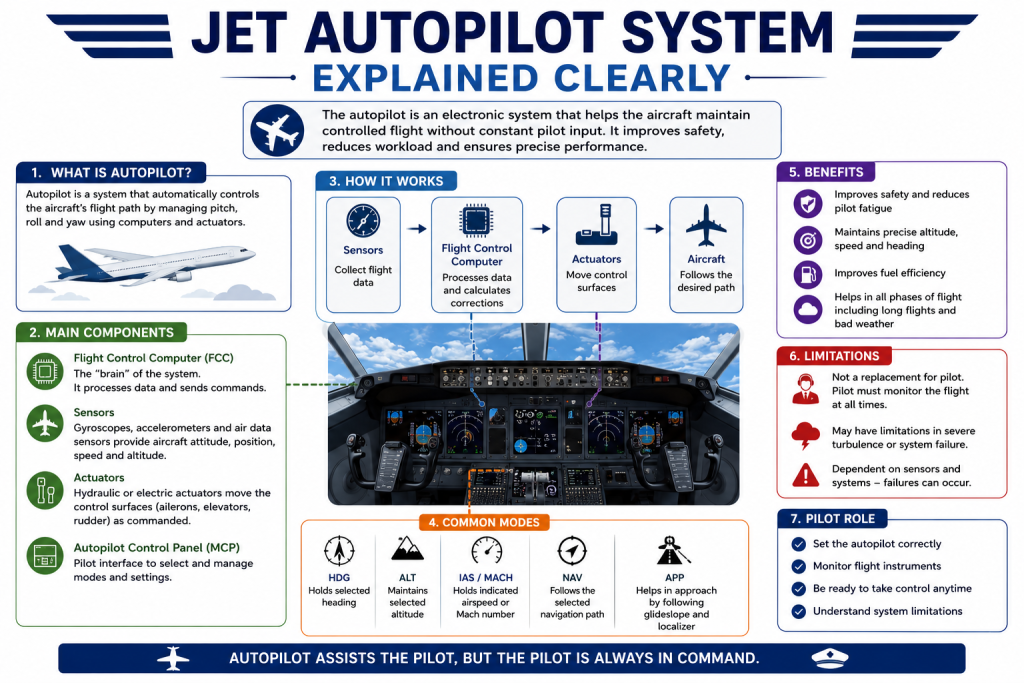
The basic idea is relatively straightforward. The pilot selects a desired target or flight mode, the system receives information about the aircraft’s current condition, and the flight-control system makes appropriate corrections to move the aircraft toward the selected target.
Main Components of a Jet Autopilot System
A jet autopilot is not one isolated piece of equipment. It is part of a larger network of aircraft systems.
Flight Control Computer
The flight-control computer processes information from various aircraft systems and determines the control commands required for the selected autopilot mode.
Depending on the aircraft architecture, the system may receive information from:
- Air-data systems
- Inertial reference systems
- Navigation systems
- Radio navigation equipment
- Flight-management systems
- Pilot-selected targets
The computer then uses this information to determine appropriate control responses.
Modern aircraft may use multiple flight-control computers and redundant systems to support reliability.
Sensors and Aircraft Data
An autopilot needs information about the aircraft’s current state before it can control the flight path.
Important information can include:
- Pitch attitude
- Roll attitude
- Heading
- Airspeed
- Altitude
- Vertical speed
- Aircraft position
This information can come from different sensors and reference systems.
For example, air-data systems provide information such as airspeed and altitude, while inertial reference systems can provide attitude, heading, and other flight information.
The exact arrangement differs according to aircraft design.
Flight Director
The flight director is closely related to the autopilot but performs a different function.
A flight director provides visual guidance to the pilot through cockpit displays. It shows the pilot what control inputs are needed to follow the selected flight path.
When the autopilot is engaged, the autopilot can follow the flight-director commands automatically.
This means:
Flight director = provides guidance
Autopilot = automatically follows appropriate flight guidance
A pilot can therefore use the flight director without necessarily engaging the autopilot.
Autopilot Servos and Flight-Control System
The autopilot must ultimately communicate its commands to the aircraft’s flight-control system.
Depending on aircraft design, automatic control may involve:
- Elevator or pitch-control systems
- Ailerons or roll-control systems
- Rudder-related functions
- Mechanical control systems
- Fly-by-wire flight-control computers
On a traditional aircraft, autopilot commands may be transmitted through servos connected to the flight controls.
On a modern fly-by-wire aircraft, autopilot commands may be processed through sophisticated flight-control computers before reaching the aircraft’s control surfaces or actuators.
How a Jet Autopilot Works
Although individual systems vary, the basic process can be understood as a continuous feedback loop.
Step 1: Aircraft Sensors Provide Information
The system receives information about the aircraft’s current flight condition.
This may include its altitude, attitude, speed, heading, and position.
Step 2: The Pilot Selects a Target or Mode
The pilot selects an appropriate target or flight mode.
For example, depending on the aircraft, the pilot may select:
- A heading
- An altitude
- A vertical speed
- An airspeed
- A navigation path
Step 3: The System Compares Actual and Desired Conditions
The autopilot compares the aircraft’s current state with the selected target.
For example, if the aircraft is below the selected altitude, the system determines how to modify its flight path to reach the target.
Step 4: The System Generates Control Commands
The flight-control system calculates appropriate commands based on its programmed control logic.
These commands may involve changes in pitch, roll, or other flight-control parameters.
Step 5: The Aircraft Responds
The aircraft responds to the automatic control commands.
If the aircraft begins to deviate from the selected flight path, the system can make further corrections.
Step 6: Continuous Feedback
The process continues throughout the flight.
The system continuously receives new information, compares it with the desired condition, and makes appropriate corrections within its capabilities.
This continuous feedback is one of the fundamental principles behind automatic flight control.
Common Jet Autopilot Modes
Different aircraft use different names and combinations of automation modes, but several common functions are found across many jet aircraft.
Heading Mode
Heading mode allows the aircraft to follow a selected heading.
The pilot selects a desired heading, and the autopilot controls the aircraft’s roll to maintain or capture that heading according to the aircraft’s mode logic.
Heading mode is useful when pilots want to maintain a specific direction without continuously making manual roll inputs.
Altitude Hold
Altitude-hold mode helps maintain a selected altitude.
Once the aircraft reaches the desired altitude and the appropriate mode is engaged, the autopilot can make pitch adjustments to maintain that altitude.
The system continues monitoring altitude and makes corrections when necessary.
Vertical Speed Mode
Vertical speed mode allows a pilot to select a desired rate of climb or descent, where supported.
For example, the pilot may select a particular climb or descent rate.
However, vertical speed and airspeed are closely related. A high selected vertical speed can affect airspeed, which means pilots must continue monitoring the aircraft carefully.
Flight Level Change or Speed Mode
Many aircraft provide automation modes that use a selected airspeed or related speed target during climbs and descents.
The exact mode name and behavior differ between aircraft.
The basic principle is to allow the aircraft to manage its vertical flight path while maintaining a selected speed according to the system’s logic.
Navigation Mode
Navigation modes can allow the aircraft to follow a lateral navigation path.
The source may be an appropriate navigation system or flight-management system, depending on the aircraft and selected mode.
Instead of manually maintaining a heading, the autopilot can follow the calculated lateral path when the appropriate navigation mode is active.
Approach Mode
Approach modes can provide more precise flight guidance during an instrument approach when the aircraft and approach system support it.
Some aircraft can use autopilot to follow lateral and vertical approach guidance.
The available functionality depends on the aircraft’s equipment, certification, approach type, and operating conditions.
Autopilot and Flight Management System
The autopilot and flight-management system are closely connected on many modern aircraft, but they are not the same system.
A flight-management system can perform functions involving:
- Route management
- Navigation calculations
- Performance information
- Position determination
- Lateral guidance
- Vertical guidance
The autopilot can then use appropriate guidance information to control the aircraft when the relevant automation modes are selected.
A simple way to understand the relationship is:
Flight-management system = helps determine where and how the aircraft should fly
Autopilot = controls the aircraft to follow selected guidance
The actual integration varies significantly between aircraft types.
Autopilot and Autothrottle or Autothrust
Another common source of confusion is the difference between autopilot and autothrottle or autothrust.
The autopilot primarily deals with aspects of flight-path control.
Autothrottle or autothrust systems, where installed, manage engine thrust according to selected or commanded targets.
For example, an aircraft may use:
- Autopilot for pitch and roll control
- Autothrust for engine thrust management
- Flight-management systems for navigation and guidance
These systems can work together to reduce pilot workload, but they perform different functions.
Autopilot Mode Awareness
One of the most important skills in modern cockpit automation is understanding what the system is actually doing.
Selecting a mode does not necessarily mean that the mode has immediately become active.
Aircraft automation commonly distinguishes between modes that are:
- Selected
- Armed
- Active
The exact terminology and display logic vary by aircraft.
Pilots therefore need to monitor the appropriate flight-mode annunciations and other cockpit indications.
For example, a pilot may expect the aircraft to capture an altitude, intercept a navigation path, or change its vertical mode. Understanding whether that function is armed or already active is essential.
Mode awareness helps prevent situations where pilots believe the aircraft is following one command while the automation is actually performing another.
What Happens When Autopilot Is Engaged?
When the autopilot is engaged correctly, the aircraft begins following the active flight-guidance commands within the system’s capabilities.
A general sequence may look like this:
- The pilot establishes the appropriate aircraft condition.
- The required automation mode is selected.
- The system confirms the relevant mode.
- The autopilot controls the aircraft according to the active guidance.
- The pilot monitors the aircraft and automation.
- The pilot changes modes or disconnects automation when necessary.
The exact sequence differs between aircraft.
The important point is that engaging autopilot does not end the pilot’s responsibilities.
What Happens When Autopilot Is Disconnected?
Autopilot can be disconnected intentionally by the pilot or may disconnect automatically in certain circumstances depending on the aircraft.
Possible causes can include:
- Pilot action
- System malfunction
- Loss of required information
- Aircraft-specific system limitations
When automation is unavailable, pilots must be prepared to control the aircraft manually or use whatever remaining flight-guidance capabilities are available.
Pilots learn these situations through aircraft-specific training and approved procedures.
The exact response to an autopilot disconnect should always follow the procedures applicable to the aircraft being flown.
Autopilot During Different Phases of Flight
Takeoff
Autopilot use during takeoff depends on aircraft design, operating procedures, and certification.
It should not be assumed that autopilot is normally engaged from the beginning of every takeoff.
Pilots initially establish control of the aircraft manually and then use automation according to the applicable procedures.
Climb
During climb, automation may help manage:
- Heading
- Navigation
- Altitude
- Vertical path
- Speed
The selected modes depend on the aircraft and operational situation.
Cruise
Autopilot is particularly useful during cruise because it can reduce the need for continuous manual control inputs.
It can help maintain the selected flight path while pilots monitor:
- Aircraft systems
- Weather
- Navigation
- Traffic
- Fuel
- Communications
- Automation modes
Automation allows pilots to devote more attention to overall flight management rather than continuously moving the controls.
Descent
During descent, pilots may use automation to manage lateral and vertical guidance.
The aircraft may follow a selected descent path or other vertical guidance depending on the aircraft’s systems and the flight plan.
Pilots continue to monitor airspeed, altitude, navigation, and other parameters.
Approach
Autopilot can be useful during instrument approaches when the aircraft supports the required automation.
It may follow appropriate lateral and vertical guidance.
However, the pilot must verify that the aircraft is properly configured and that the automation is operating as expected.
Landing
Some highly equipped aircraft support automatic landing operations under appropriate conditions and certification.
However, not every jet has automatic landing capability.
Automatic landing also depends on factors such as aircraft equipment, runway facilities, approach conditions, and applicable operating procedures.
Therefore, “autopilot can land every jet” is an incorrect assumption.
Benefits of Jet Autopilot Systems
Reduced Pilot Workload
One of the major benefits of autopilot is reducing the amount of continuous manual control required from pilots.
This can be particularly useful during long flights.
Accurate Flight-Path Control
Autopilot systems can make frequent small corrections to maintain a selected flight path.
This can help provide consistent control within the system’s design capabilities.
Support During High-Workload Periods
During busy phases of flight, automation can help manage certain flight-control tasks while pilots focus on other responsibilities.
Navigation Management
When integrated with appropriate navigation systems, autopilot can follow selected or programmed navigation guidance.
Consistent Control
Automatic flight-control systems can make precise corrections based on continuous feedback from aircraft sensors and reference systems.
However, these benefits depend on correct configuration, accurate information, and proper monitoring.
Limitations of Jet Autopilot Systems
Autopilot is a powerful tool, but it has important limitations.
Autopilot Does Not Understand the Flight Like a Human Pilot
The system follows programmed control logic and available information.
It does not have human judgment, situational awareness, or the ability to independently evaluate a developing situation in the same way a pilot does.
Autopilot Depends on Accurate Inputs
Automation relies on information from sensors, navigation systems, and other aircraft equipment.
If required information becomes unreliable or unavailable, autopilot functionality may be affected.
Mode Confusion
A pilot may misunderstand which automation mode is active or what the system is expected to do.
This is why mode awareness is such an important part of flight training.
System Limitations
Every autopilot has limitations.
Its capabilities depend on aircraft design, system architecture, certification, and operating conditions.
Pilot Monitoring Remains Essential
Even when the autopilot is engaged, pilots continue to monitor:
- Attitude
- Airspeed
- Altitude
- Flight path
- Navigation
- Engine parameters
- Aircraft systems
- Automation modes
Common Misunderstandings About Jet Autopilot
“Autopilot Flies the Aircraft Completely on Its Own”
This is one of the biggest misconceptions.
Autopilot can control specific aspects of flight, but it does not replace the flight crew.
Pilots select modes, monitor performance, manage the aircraft, communicate with air traffic control, assess weather and traffic, and make decisions.
“Pilots Do Nothing When Autopilot Is On”
This is also incorrect.
Pilot workload changes when automation is used, but responsibility does not disappear.
In many situations, monitoring and managing automation effectively requires considerable knowledge and attention.
“Autopilot Can Fix Every Flight Problem”
Autopilot is not designed to solve every abnormal or unexpected situation.
It has defined capabilities and limitations.
Pilots must recognize when automation is inappropriate or unavailable.
“All Jet Autopilots Work the Same Way”
Different aircraft can have significantly different automation systems.
Mode names, controls, displays, logic, and capabilities can vary between manufacturers and aircraft models.
“Automation Is Always Safer Than Manual Flying”
Automation can provide significant benefits when properly used, but it is not automatically appropriate in every situation.
Safe operation depends on using the system correctly, understanding its limitations, and maintaining pilot awareness.
Autopilot Safety and Pilot Responsibilities
Effective use of automation requires more than knowing which button to press.
Pilots need to understand:
- Which mode is selected
- Which mode is active
- What the aircraft is expected to do
- What the aircraft is actually doing
- What information the system is using
- What limitations apply
- When manual intervention may be required
Pilots should also maintain situational awareness instead of becoming overly dependent on automation.
If the aircraft does something unexpected, the pilot must be able to recognize the situation and respond appropriately using aircraft-specific procedures and training.
Common Autopilot-Related Pilot Mistakes
Selecting the Wrong Mode
Selecting an incorrect mode can result in the aircraft responding differently from what the pilot expects.
Failing to Confirm the Active Mode
Pilots should monitor the appropriate cockpit indications rather than assuming that the desired mode is active.
Misunderstanding Armed Modes
A mode that is armed may not yet be controlling the aircraft.
Understanding the difference between armed and active modes is important.
Not Monitoring Airspeed
Some vertical modes can have a significant effect on airspeed.
Pilots must continue monitoring aircraft performance.
Failing to Cross-Check Altitude
Altitude should continue to be monitored even when the autopilot is expected to maintain it.
Assuming the Aircraft Will Follow an Unintended Path
Pilots must verify navigation and flight-guidance selections.
Becoming Overly Dependent on Automation
Automation should support pilot workload, not replace pilot awareness.
Failing to Recognize Automation Changes
Pilots should remain alert to unexpected mode changes, disconnects, or system indications.
Not Being Prepared for Manual Flight
Pilots must maintain the skills and readiness necessary to control the aircraft manually when required.
Jet Autopilot System Comparison
| System/Function | Primary Purpose | Pilot Responsibility |
|---|---|---|
| Flight Director | Provides visual flight guidance | Monitor and follow guidance |
| Autopilot | Automatically controls aspects of aircraft flight | Monitor and manage automation |
| Autothrottle/Autothrust | Manages engine thrust | Monitor speed and thrust modes |
| Flight Management System | Supports navigation and performance management | Enter, verify, and monitor information |
| Navigation System | Provides navigation information | Verify navigation source and route |
| Flight-Control Computer | Processes inputs and generates control commands | Monitor system status |
The actual integration and capabilities of these systems vary according to aircraft type.
How Pilots Learn to Use Autopilot Systems
Pilots do not learn autopilot operation simply by memorizing cockpit buttons.
Training generally involves understanding the underlying systems and practicing their use through appropriate training programs.
This may include:
- Ground school
- Aircraft systems lessons
- Simulator sessions
- Flight training
- Cockpit procedures
- Recurrent training
- Aircraft-specific manuals and approved training material
Simulator training can be particularly useful because pilots can practice automation modes and system behavior in a controlled environment.
The objective is to understand not only how automation works normally, but also how to recognize when it is not behaving as expected.
Tips for Understanding Jet Autopilot Systems as a Student
Learn Basic Flight-Control Principles First
Before studying automation, understand how pitch, roll, yaw, altitude, heading, and airspeed relate to aircraft control.
Understand the Difference Between Autopilot and Flight Director
Knowing this distinction makes many other automation concepts easier to understand.
Study Mode Logic
Learn how the aircraft’s particular automation modes operate.
Do not assume that a mode on one aircraft behaves identically on another.
Learn Cockpit Annunciations
Understand how the aircraft displays active and armed modes.
Practice Mode Awareness
When using a simulator, practice identifying what the aircraft is currently doing and why.
Understand Automation Limitations
Know when the system can and cannot perform a particular function.
Use Simulator Training
Simulation provides an opportunity to practice automation concepts without the risks associated with real-world experimentation.
Study Aircraft-Specific Material
Once training on a particular aircraft begins, students should use the applicable aircraft manuals and approved training material.
Ask Instructors Questions
If a mode or automation function is confusing, discuss it with a qualified instructor rather than relying on assumptions.
Avoid Memorizing Button Sequences Without Understanding
Knowing which button to press is less useful if the pilot does not understand what the selected mode is supposed to accomplish.
Frequently Asked Questions
1. What is a jet autopilot system?
A jet autopilot is an automatic flight-control system that can control certain aspects of an aircraft’s flight according to selected guidance and the system’s capabilities.
2. How does a jet autopilot control an aircraft?
The system receives information about the aircraft’s current condition, compares it with selected targets or guidance, and generates control commands to reduce the difference between the actual and desired flight path.
3. What is the difference between autopilot and flight director?
A flight director provides visual guidance to the pilot, while the autopilot can automatically follow appropriate flight-guidance commands when engaged.
4. What is the difference between autopilot and autothrottle?
Autopilot primarily controls aspects of aircraft flight path, while autothrottle or autothrust systems manage engine thrust. Both can work together on suitably equipped aircraft.
5. Can a jet autopilot control altitude?
Many jet autopilot systems can maintain or capture an altitude when the appropriate mode is selected. The exact functionality varies by aircraft.
6. Can autopilot follow a programmed route?
On appropriately equipped aircraft, autopilot can follow suitable lateral navigation guidance provided by navigation or flight-management systems.
7. Can autopilot land a jet automatically?
Some aircraft are certified and equipped for automatic landing under appropriate conditions. However, automatic landing is not available on every jet aircraft.
8. Does autopilot replace the pilot?
No. Autopilot is a tool that assists the flight crew. Pilots remain responsible for monitoring the aircraft, managing automation, making decisions, and taking control when necessary.
9. What happens if the autopilot disconnects?
The aircraft may require manual control or the use of remaining flight-guidance functions, depending on the circumstances and aircraft design. Pilots are trained to respond according to aircraft-specific procedures.
10. Why is autopilot mode awareness important?
Mode awareness helps pilots understand what the automation is currently doing and what it is expected to do next. This reduces the risk of misunderstanding automation behavior.
Conclusion
The jet autopilot system is an important part of modern aircraft automation, but it is only one component of a much larger flight-control and guidance environment.
It works by receiving information about the aircraft’s condition, comparing that information with selected targets or guidance, and generating appropriate control commands. Depending on the aircraft, the system can assist with heading, altitude, vertical flight, navigation, approaches, and other aspects of flight.
Autopilot also works closely with systems such as the flight director, flight-management system, navigation equipment, and autothrottle or autothrust. Understanding the difference between these systems is essential for aviation students and pilots.
