
Introduction
Modern development teams are expected to release software quickly without creating security or reliability risks. However, security is often added only before production deployment. At that stage, fixing vulnerabilities becomes expensive, disruptive, and time-consuming.
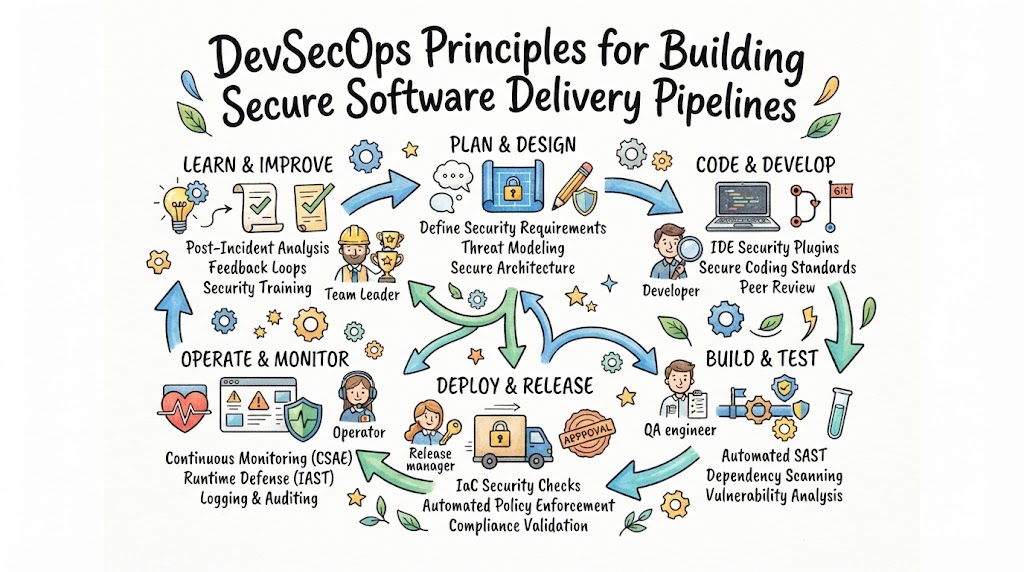
DevSecOps principles solve this problem by making security part of planning, coding, testing, deployment, and operations. Security checks are automated wherever possible, while developers, operations teams, and security specialists share responsibility for protecting applications.
DevSecOps does not mean purchasing one security tool or adding another approval stage. It is a working approach that combines secure development practices, automated testing, controlled access, continuous monitoring, and fast feedback.
This article explains important DevSecOps concepts, implementation steps, tools, challenges, projects, career opportunities, interview questions, DORA metrics, and practical use cases. It also explains how BestDevOps and DevOpsIQ can support learning and engineering improvement.
Why DevSecOps Principles Matter
For beginners
DevSecOps helps beginners understand that application security is not separate from software development. They learn secure coding, access management, vulnerability testing, and monitoring while building practical DevOps skills.
For DevOps professionals
DevOps engineers manage pipelines, infrastructure, containers, and deployment systems. DevSecOps helps them protect these systems without depending entirely on manual security reviews.
For SRE teams
SRE teams focus on reliability and service availability. Security failures can cause outages, data exposure, and customer impact. DevSecOps allows SRE teams to detect risks earlier and respond using reliable operational processes.
For platform engineers
Platform teams build reusable services and internal developer platforms. They can add approved templates, security scanning, secrets management, and policy enforcement directly into the platform.
For engineering managers
Managers need visibility into delivery risk without slowing teams unnecessarily. DevSecOps provides measurable controls and clearer information about vulnerabilities, failed security checks, exceptions, and remediation progress.
For software organizations
Organizations need both delivery speed and responsible risk management. DevSecOps creates repeatable security practices that can operate across applications, teams, and cloud environments.
The Role of DevSecOps in Modern Software Delivery
Cloud computing, containers, APIs, open-source packages, and infrastructure automation have made software delivery faster. They have also increased the number of components that teams must secure.
An application may depend on hundreds of libraries, container images, cloud services, credentials, APIs, and infrastructure resources. A weakness in any of these areas can affect the complete system.
DevSecOps introduces security controls throughout the software lifecycle:
- During planning, teams define security requirements.
- During coding, developers use secure coding standards.
- During builds, pipelines scan dependencies and source code.
- During deployment, policies validate infrastructure and containers.
- During operations, monitoring identifies suspicious activity.
- During incidents, teams investigate, recover, and improve controls.
The objective is not to remove every possible risk. The objective is to identify important risks early, respond consistently, and make secure delivery part of normal engineering work.
Important DevSecOps Concepts
Shared security responsibility
Security is not owned only by a security department. Developers, DevOps engineers, SREs, testers, platform teams, and managers all make decisions that affect security.
Security specialists provide standards and expertise, while engineering teams apply those standards during daily work.
Shift-left security
Shift-left security means moving security activities earlier in development.
For example, instead of discovering an insecure dependency before production deployment, a dependency scanner can identify it when a developer creates a pull request.
Earlier feedback normally reduces remediation effort and prevents vulnerable code from progressing through the pipeline.
Shift-right security
Shift-right security focuses on applications after deployment. It includes runtime monitoring, threat detection, audit logs, incident response, penetration testing, and production validation.
Shift-left and shift-right security should work together. Testing before deployment cannot replace runtime visibility.
Security automation
Automation makes security checks repeatable and scalable. Common automated activities include:
- Source-code scanning
- Dependency scanning
- Secrets detection
- Container-image scanning
- Infrastructure policy validation
- Compliance checks
- Runtime monitoring
Automation should support engineers with useful feedback rather than creating large numbers of unexplained alerts.
Secure software supply chain
The software supply chain includes source code, third-party packages, build systems, container registries, deployment tools, and infrastructure definitions.
Teams must verify where software components come from, who changed them, how they were built, and whether they contain known vulnerabilities.
Least-privilege access
Least privilege means giving users, services, and applications only the permissions required to perform their tasks.
For example, a CI/CD pipeline that only deploys to a test environment should not have administrator access to every production system.
Policy as Code
Policy as Code expresses security and compliance rules in machine-readable files. Automated systems can then evaluate infrastructure, Kubernetes configurations, or deployment requests against those rules.
This creates faster and more consistent policy enforcement.
Continuous monitoring
Security does not end after deployment. Teams must continuously monitor authentication events, configuration changes, application behavior, network activity, vulnerabilities, and service health.
Step-by-Step DevSecOps Implementation Process
| Step | What to Do | Why It Matters | Tools or Skills | Common Mistake | Expected Result |
|---|---|---|---|---|---|
| 1. Assess the current process | Map development, testing, deployment, access, and incident workflows | Reveals existing security gaps | Process mapping, risk analysis | Purchasing tools before understanding problems | A clear security baseline |
| 2. Define ownership | Assign responsibility for code, pipelines, infrastructure, and vulnerabilities | Prevents unresolved findings | RACI model, team communication | Sending every issue to the security team | Clear accountability |
| 3. Set security requirements | Define rules for authentication, encryption, dependencies, logging, and data handling | Gives teams measurable expectations | Security standards, threat modeling | Using unclear statements such as “make it secure” | Actionable requirements |
| 4. Protect source control | Enable branch protection, reviews, signed commits where required, and strong access controls | Source repositories are a major attack target | Git, GitHub, GitLab, access management | Giving excessive repository permissions | Better code integrity |
| 5. Add code scanning | Run static analysis and secrets detection during pull requests | Finds problems before code is merged | SAST, secrets scanners | Blocking builds for every low-risk warning | Earlier and prioritized feedback |
| 6. Scan dependencies | Identify vulnerable or outdated libraries | Third-party packages can introduce serious risk | SCA tools, SBOM generation | Ignoring transitive dependencies | Better dependency visibility |
| 7. Secure build artifacts | Scan images, sign artifacts, and protect registries | Reduces software supply-chain risk | Container scanners, artifact signing | Using unverified public images | Trusted build outputs |
| 8. Validate infrastructure | Check Infrastructure as Code and Kubernetes files before deployment | Prevents insecure cloud configurations | Terraform scanning, policy engines | Reviewing infrastructure only after creation | Safer environments |
| 9. Add deployment controls | Use approvals for high-risk changes and automated policy gates | Prevents unsafe releases | CI/CD, RBAC, Policy as Code | Adding too many manual approvals | Controlled delivery |
| 10. Monitor production | Collect logs, security events, metrics, and traces | Detects threats and operational problems | SIEM, observability, alerting | Collecting data without response procedures | Faster detection and recovery |
| 11. Improve incident response | Create playbooks and test recovery procedures | Reduces confusion during incidents | Runbooks, incident tools | Writing plans without testing them | More reliable response |
| 12. Measure and improve | Review vulnerabilities, recovery time, failed controls, and deployment outcomes | Supports continuous improvement | DORA metrics, engineering intelligence | Using metrics to blame individuals | Better engineering decisions |
DevSecOps Tools and Their Roles
DevSecOps requires different tools at different stages. A small team may use a limited toolset, while a regulated enterprise may need deeper controls and reporting.
The right choice depends on project size, integrations, budget, compliance obligations, technical architecture, and team experience.
Source-code management
GitHub, GitLab, Bitbucket, and similar platforms manage code changes, reviews, branches, and access controls.
CI/CD platforms
Jenkins, GitHub Actions, GitLab CI/CD, Azure Pipelines, and similar tools automate builds, tests, security checks, and deployments.
Static application security testing
SAST tools inspect source code for insecure patterns without running the application.
Software composition analysis
SCA tools examine third-party libraries and identify known vulnerabilities, licensing concerns, and outdated components.
Container security
Container scanners inspect operating-system packages, libraries, configurations, and image contents.
Kubernetes security
Kubernetes security tools evaluate manifests, admission policies, workloads, network rules, and runtime activity.
Infrastructure as Code security
IaC scanners inspect Terraform, CloudFormation, Kubernetes YAML, and other configuration files before resources are created.
Secrets management
Secrets managers store and control access to API keys, passwords, tokens, certificates, and other sensitive values.
Observability and security monitoring
Monitoring platforms collect metrics, logs, traces, events, and alerts. This information helps teams connect security events with application and infrastructure behavior.
DevSecOps Tool Comparison
| Tool | Main Purpose | Key Features | Best Suited For | Learning Difficulty |
|---|---|---|---|---|
| GitHub Advanced Security | Repository security | Code scanning, dependency review, secrets detection | Teams using GitHub workflows | Medium |
| GitLab Security Scanning | Integrated pipeline security | SAST, dependency, container, and secrets scanning | GitLab-based delivery teams | Medium |
| SonarQube | Code quality and static analysis | Security rules, quality gates, code-smell detection | Development teams improving code standards | Medium |
| Snyk | Developer-focused security testing | Dependency, code, container, and IaC scanning | Teams wanting early developer feedback | Medium |
| Trivy | Vulnerability and configuration scanning | Container, filesystem, repository, and IaC scanning | Cloud-native and open-source projects | Easy to medium |
| Checkov | Infrastructure as Code scanning | Terraform, Kubernetes, and cloud policy checks | Infrastructure automation teams | Medium |
| HashiCorp Vault | Secrets management | Central secrets storage, dynamic credentials, access policies | Teams managing multiple environments | Advanced |
| Open Policy Agent | Policy as Code | Flexible policy evaluation and admission control | Platform and Kubernetes teams | Advanced |
| Falco | Runtime threat detection | Container and Kubernetes activity monitoring | Cloud-native security teams | Advanced |
| Prometheus | Metrics monitoring | Time-series metrics, alerting integrations | Kubernetes and SRE teams | Medium |
Benefits of Applying DevSecOps Principles
Earlier vulnerability detection
Security problems are identified while developers still understand the related code and context. This usually makes remediation easier.
Safer software delivery
Automated checks reduce the likelihood of insecure code, vulnerable images, or unsafe infrastructure reaching production.
Better collaboration
Developers, security teams, and operations professionals work through shared pipelines and clear ownership instead of isolated processes.
Reduced manual work
Automated scanning, policy validation, and evidence collection reduce repetitive reviews.
Stronger visibility
Dashboards and engineering timelines help teams understand which changes introduced risk and how quickly issues were resolved.
Faster incident recovery
Logs, traces, deployment records, and security events provide the context needed to investigate incidents.
More consistent compliance
Policy as Code and automated evidence collection help teams apply common standards across environments.
Better engineering decisions
Security data becomes more useful when combined with deployment, reliability, incident, and recovery information.
Common DevSecOps Challenges and Solutions
| Challenge | Practical Solution |
|---|---|
| Too many tools | Begin with the most important risks and choose tools that integrate with existing workflows. |
| Excessive false positives | Tune rules, remove duplicate alerts, and prioritize findings by severity and exploitability. |
| Slow pipelines | Run fast checks during pull requests and schedule deeper scans separately when appropriate. |
| Weak ownership | Assign every application, pipeline, service, and vulnerability to a responsible team. |
| Security knowledge gaps | Provide practical secure-coding labs, examples, and support from security specialists. |
| Developer resistance | Make results understandable and provide remediation guidance inside normal tools. |
| Exposed secrets | Use automated secrets detection and move credentials into a secure secrets manager. |
| Insecure legacy systems | Apply improvements gradually based on business risk and system criticality. |
| Missing runtime visibility | Combine pre-deployment scanning with production logs, metrics, and threat detection. |
| Misused metrics | Measure systems and processes rather than ranking individual employees. |
DevSecOps Best Practices
Begin with risk, not tools
Identify critical applications, sensitive data, attack paths, and regulatory requirements before selecting products.
Keep security feedback close to developers
Display findings in pull requests, pipeline logs, and development environments. Clear feedback is more useful than a separate report delivered weeks later.
Prioritize exploitable risks
Not every vulnerability creates equal risk. Consider severity, application exposure, available exploits, affected data, and compensating controls.
Protect CI/CD credentials
Use short-lived credentials, restricted service accounts, protected variables, and separate permissions for development and production.
Use trusted build components
Maintain approved base images, verify package sources, scan artifacts, and create a software bill of materials where appropriate.
Review exceptions regularly
Some security findings may receive temporary exceptions. Every exception should have an owner, reason, expiration date, and review process.
Test incident procedures
Run security simulations and recovery exercises. A written incident plan is useful only when teams understand how to apply it.
Measure improvement carefully
Track remediation time, recurring vulnerabilities, security-control failures, and incident recovery. Avoid rewarding teams for hiding problems.
Practical DevSecOps Example
Consider a team developing an online payment application.
A developer creates a pull request containing application code and a Terraform change. The pipeline performs the following actions:
- A secrets scanner checks whether credentials were accidentally committed.
- A SAST tool analyzes the code for insecure patterns.
- An SCA tool checks third-party packages.
- Unit and integration tests validate expected behavior.
- An IaC scanner checks the Terraform configuration.
- A container image is built and scanned.
- The image is signed and stored in a protected registry.
- A policy engine validates the Kubernetes deployment.
- The application is deployed to a test environment.
- Runtime tests and monitoring confirm normal behavior.
A critical finding stops the pipeline and provides remediation instructions. A low-risk issue may be recorded for later review without stopping every deployment.
This risk-based approach maintains delivery flow while preventing serious problems from moving forward.
Real-World DevSecOps Use Cases
Startups
Startups can begin with branch protection, dependency scanning, secrets detection, container scanning, and managed cloud security services.
Medium-sized companies
These organizations can create standard pipeline templates, centralized secrets management, approved container images, and shared security dashboards.
Large enterprises
Enterprises may use policy-driven controls, detailed audit evidence, application-risk classification, artifact signing, and centralized security governance.
Cloud-native teams
Cloud-native teams can scan images, validate Kubernetes manifests, enforce admission policies, and monitor runtime behavior.
SRE teams
SRE teams can connect security incidents with reliability signals, deployment events, SLO performance, and recovery timelines.
Platform engineering teams
Platform teams can create secure templates and paved roads that make the approved method the easiest method for developers.
Regulated organizations
Regulated organizations can automate access reviews, policy checks, evidence collection, logging requirements, and change records.
DevSecOps Learning Roadmap
| Stage | Important Concepts | Practical Exercise | Expected Outcome |
|---|---|---|---|
| DevOps fundamentals | Collaboration, automation, delivery lifecycle | Map a basic delivery workflow | Understand DevOps processes |
| Linux and networking | Permissions, processes, ports, DNS, TLS | Secure a Linux web server | Build infrastructure fundamentals |
| Git and source control | Branches, reviews, access controls | Configure a protected repository | Manage code safely |
| Scripting | Bash, Python, automation | Write a security-checking script | Automate repetitive tasks |
| CI/CD | Builds, tests, artifacts, gates | Create a basic pipeline | Understand delivery automation |
| Containers | Images, registries, Dockerfiles | Build and scan an image | Identify container risks |
| Kubernetes | RBAC, secrets, policies, networking | Deploy a secured application | Manage cloud-native security |
| Cloud platforms | IAM, networks, storage, logging | Build a restricted cloud environment | Understand cloud security |
| Infrastructure as Code | Terraform, modules, state | Scan Terraform before deployment | Prevent configuration problems |
| Monitoring and observability | Logs, metrics, traces, alerts | Build an incident dashboard | Improve production visibility |
| Security and DevSecOps | SAST, SCA, secrets, threat modeling | Add security checks to CI/CD | Integrate continuous security |
| SRE and platform engineering | SLOs, error budgets, paved roads | Create a secure service template | Support reliable delivery |
| DORA metrics and intelligence | Delivery and recovery metrics | Analyze deployment and incident data | Make informed improvements |
Essential DevOps and DevSecOps Skills
Technical skills include Linux administration, networking, Git, scripting, CI/CD, Docker, Kubernetes, cloud computing, Infrastructure as Code, monitoring, secrets management, identity management, and security testing.
Professionals also need strong troubleshooting skills. A scanner may report a problem, but engineers must understand its context, impact, and possible solution.
Non-technical skills are equally important. DevSecOps engineers must communicate risk clearly, collaborate across departments, document decisions, manage priorities, and support teams without creating unnecessary conflict.
These abilities form an important part of modern DevOps engineer skills because secure delivery depends on both technology and teamwork.
Practical DevSecOps Projects
| Project | Objective | Tools Required | Main Tasks | Skills Developed | Expected Result |
|---|---|---|---|---|---|
| Secure Git repository | Protect source-code workflows | GitHub or GitLab | Configure reviews, branch rules, and secrets scanning | Git security and access control | Safer code changes |
| Security-enabled CI pipeline | Add automated application checks | Jenkins or GitHub Actions, SonarQube, Trivy | Scan code, dependencies, and images | CI/CD security | Repeatable security testing |
| Secure container project | Build a safer application image | Docker, Trivy | Use minimal images, scan packages, run as non-root | Container security | Reduced image risk |
| IaC policy project | Prevent unsafe cloud resources | Terraform, Checkov | Create infrastructure and enforce policies | Cloud and IaC security | Validated infrastructure |
| Kubernetes security project | Protect a cluster workload | Kubernetes, OPA or Kyverno | Configure RBAC, network rules, and policies | Kubernetes security | Controlled workload deployment |
| DevSecOps observability platform | Connect delivery, security, and reliability data | Prometheus, Grafana, logging tools | Track deployments, alerts, and incidents | Monitoring and analysis | Better operational visibility |
These DevOps projects progress from basic repository protection to advanced cloud-native security and engineering intelligence.
Courses and Certifications
A structured course can help beginners who need a clear learning sequence. Working professionals may use courses to strengthen knowledge in Kubernetes security, cloud security, secure coding, or pipeline automation.
Certification may be useful when a role requires formal evidence of knowledge. Relevant areas include cloud security, Kubernetes security, DevOps, application security, and security operations.
Practical training should include:
- Secure repository configuration
- CI/CD security integration
- Container and Kubernetes scanning
- Secrets management
- Cloud identity controls
- Infrastructure policy validation
- Monitoring and incident exercises
When comparing the Best DevOps Course options, review the lab quality, syllabus depth, instructor experience, tool coverage, support, and project work. The Best DevOps Certifications for one person may not be appropriate for another role.
Certificates can support learning, but they cannot replace troubleshooting ability or real implementation experience.
Career Opportunities
| Role | Main Responsibilities | Important Skills |
|---|---|---|
| DevOps Engineer | Build pipelines and automate infrastructure | CI/CD, cloud, IaC, scripting |
| DevSecOps Engineer | Add security controls throughout delivery | Security testing, pipelines, cloud security |
| Site Reliability Engineer | Improve reliability and incident recovery | SLOs, observability, automation |
| Platform Engineer | Build reusable internal platforms | Kubernetes, APIs, security policies |
| Cloud Engineer | Design and operate cloud environments | IAM, networking, cloud services |
| Automation Engineer | Automate testing and operational processes | Scripting, pipelines, APIs |
| Infrastructure Engineer | Manage systems and infrastructure | Linux, networking, IaC |
| Build and Release Engineer | Control builds and release workflows | Artifact management, CI/CD |
| Observability Engineer | Develop monitoring and telemetry systems | Metrics, logs, traces |
| Engineering Productivity Engineer | Improve development workflows and tooling | Developer platforms, analytics, automation |
DevOps Engineer Salary Factors
A DevOps Engineer salary can vary significantly. Important factors include country, city, experience level, cloud knowledge, security skills, certifications, organization size, industry, and project responsibility.
Professionals who can design secure pipelines, troubleshoot distributed systems, automate cloud infrastructure, and communicate effectively may qualify for broader responsibilities. However, salary should not be estimated from a job title alone.
Candidates should compare current local job listings and reliable salary research for their location. Compensation varies by employer, business requirements, technical depth, and role scope.
DevSecOps Interview Questions and Answers
1. What is DevSecOps?
DevSecOps integrates security into development, delivery, and operations. It combines shared responsibility, automation, continuous testing, and production monitoring.
2. How is DevSecOps different from traditional security?
Traditional security may depend on reviews near release time. DevSecOps introduces security activities throughout the complete delivery lifecycle.
3. What does shift-left security mean?
It means performing security analysis earlier, such as scanning code and dependencies during pull requests rather than waiting until deployment.
4. Why is shift-right security necessary?
Pre-deployment testing cannot detect every runtime problem. Shift-right practices provide production monitoring, threat detection, and incident feedback.
5. What is SAST?
Static application security testing examines source code or compiled code for insecure patterns without running the application.
6. What is software composition analysis?
Software composition analysis identifies third-party packages, known vulnerabilities, outdated components, and possible licensing concerns.
7. How should secrets be managed in CI/CD?
Secrets should be stored in protected secret-management systems and accessed through restricted, preferably short-lived credentials.
8. How can teams secure container images?
Teams can use trusted base images, remove unnecessary packages, run as non-root users, scan images, and sign approved artifacts.
9. What is Policy as Code?
Policy as Code represents security or compliance rules in files that automated systems can evaluate consistently.
10. How would you handle a critical pipeline vulnerability?
Confirm the finding, identify affected releases, stop unsafe deployment, assign ownership, apply remediation, retest, and document the response.
11. Should every security finding stop deployment?
No. Teams should use risk-based thresholds. Critical exploitable findings may block deployment, while lower-risk issues may follow a tracked remediation process.
12. How can Kubernetes access be restricted?
Use role-based access control, service accounts with limited permissions, namespace controls, network policies, and regular access reviews.
13. What is an SBOM?
A software bill of materials is an inventory of the components and dependencies included in a software product.
14. How can Infrastructure as Code improve security?
Infrastructure definitions can be reviewed, scanned, versioned, and tested before cloud resources are created.
15. Why are pipeline logs important?
They provide evidence about builds, tests, approvals, security checks, deployments, and failed actions.
16. How does observability support DevSecOps?
Metrics, logs, traces, and events help teams detect suspicious activity and connect it with application or infrastructure changes.
17. Can deployment frequency and security improve together?
Yes. Reliable automation can provide fast security feedback while reducing slow, inconsistent manual checks.
18. How should DORA metrics be used in DevSecOps?
They should help teams understand whether security controls support safe delivery and recovery. They should not be used to punish individual employees.
DORA Metrics and Engineering Intelligence
DORA metrics help teams evaluate software delivery performance.
Deployment frequency
Deployment frequency measures how often a team successfully releases changes. Frequent deployments can indicate a healthy delivery process, but frequency should not be increased at the cost of security or reliability.
Lead time for changes
Lead time measures how long a code change takes to reach production. Automated security checks can reduce waiting time by providing earlier feedback.
Change-failure rate
Change-failure rate measures the percentage of deployments that cause incidents, rollbacks, service degradation, or corrective work.
Security-related failures should be included when they affect production services.
Time to restore service
This metric measures how quickly a team restores service after a failure. Effective monitoring, rollback procedures, incident ownership, and tested playbooks can improve recovery.
Supporting operational metrics
Teams may also track:
- Mean time to recovery
- Mean time to resolution
- Incident trends
- SLO compliance
- Error-budget consumption
- Rollback frequency
- Repeated vulnerabilities
- Service health
- Security-control failures
Engineering productivity should not be reduced to one number. Metrics need technical context, application criticality, team feedback, and customer impact.
DORA Metrics Tools Comparison
| Tool Type | Data Collected | Main Insight | Suitable Team |
|---|---|---|---|
| Source-control analytics | Commits, pull requests, reviews | Development flow and change activity | Development teams |
| CI/CD analytics | Builds, tests, deployments, failures | Delivery speed and pipeline reliability | DevOps teams |
| Incident-management analytics | Alerts, incidents, acknowledgements, recovery | Incident response performance | SRE and operations teams |
| Observability platforms | Metrics, logs, traces, service events | Reliability and production behavior | Cloud-native teams |
| Security platforms | Vulnerabilities, policies, findings, remediation | Application and infrastructure risk | Security and DevSecOps teams |
| Engineering intelligence platforms | Combined delivery and operational data | DORA metrics and service trends | Engineering leaders |
| SLO platforms | Reliability targets and error budgets | Service-objective performance | SRE teams |
DORA Metrics Tools should help teams identify process problems and improvement opportunities. They should not become employee-surveillance or individual-ranking systems.
How BestDevOps Supports Learning
BestDevOps provides practical resources for people building DevOps and DevSecOps knowledge. Readers can use its DevOps tutorials, tool comparisons, learning roadmaps, project ideas, career resources, certification guidance, salary information, and interview preparation materials.
A beginner can start with a DevOps Tutorial for Beginners, learn Linux and Git, and then progress through CI/CD, containers, cloud computing, Infrastructure as Code, observability, and security.
Working professionals can use the platform to compare the Best DevOps Tools, strengthen technical understanding, prepare for DevOps Interview Questions, and plan a structured DevOps Roadmap.
The value of these resources increases when readers combine them with hands-on labs and practical projects.
DevOpsIQ Use Cases for DevSecOps Teams
DevOpsIQ can connect engineering information from platforms such as GitHub, GitLab, Jenkins, Jira, Prometheus, and Datadog.
This unified view can help teams connect:
- Code changes with deployments
- Deployments with incidents
- Failed releases with rollbacks
- Incidents with recovery events
- Service performance with SLO targets
- Error-budget usage with reliability problems
- Delivery activity with DORA metrics
Its engineering timelines can help teams investigate what changed before a failure and how quickly the service recovered.
The Pulse Score provides a transparent summary of service health. It may help leaders identify services that need investigation, but one score cannot explain every engineering problem.
Teams should combine the Pulse Score with deployment history, incident details, monitoring information, application context, and feedback from engineers.
Used responsibly, DevOpsIQ can support better prioritization and engineering decisions without turning metrics into individual performance targets.
Future DevSecOps Trends
AI-assisted security operations
AI-assisted systems may help summarize findings, detect unusual patterns, group related alerts, and suggest possible remediation. Human review will remain important for high-impact decisions.
Internal developer platforms
Platform engineering teams will continue adding approved security controls to reusable service templates and deployment workflows.
Software supply-chain protection
Artifact signing, dependency verification, SBOM management, and build provenance will become more important as applications depend on larger software ecosystems.
Policy as Code
Organizations will increasingly automate infrastructure, access, compliance, and Kubernetes rules through version-controlled policies.
GitOps security
GitOps workflows will improve traceability by storing desired infrastructure and application configuration in Git repositories.
Reliability automation
Security events, deployment information, observability data, and incident response systems will become more closely connected.
Engineering intelligence
Engineering intelligence platforms will help teams understand relationships between code changes, deployments, failures, recovery, security risks, and service health.
Frequently Asked Questions
1. Can a small team implement DevSecOps?
Yes. A small team can begin with repository protection, dependency scanning, secrets detection, secure cloud access, and basic production monitoring.
2. Does DevSecOps slow software delivery?
Poorly designed controls can create delays. Well-integrated automation usually provides faster feedback than late manual reviews.
3. Which DevSecOps control should be implemented first?
Start with the highest risks. For many teams, source-control protection, secrets scanning, dependency scanning, and restricted access are good starting points.
4. Is DevSecOps only relevant to cloud applications?
No. DevSecOps can be applied to cloud systems, on-premises applications, mobile software, APIs, embedded systems, and hybrid environments.
5. How often should security scans run?
Fast checks should normally run during code changes and builds. Deeper scans can run on scheduled intervals and before important releases.
6. What happens when a security tool reports a false positive?
The team should verify the finding, document the decision, tune the rule where appropriate, and prevent repeated unnecessary alerts.
7. Who owns vulnerabilities in a DevSecOps model?
Ownership usually belongs to the team responsible for the affected service, with support and guidance from security specialists.
8. How can legacy applications adopt DevSecOps?
Begin with visibility, dependency scanning, access control, logging, and prioritized remediation. Improvements can then be added gradually.
9. Is penetration testing still needed?
Yes. Automated scanning is valuable but may not identify complex business-logic problems or attack paths that require human investigation.
10. How can teams measure DevSecOps progress?
Teams can track remediation time, repeated findings, control coverage, security incidents, pipeline reliability, and recovery performance.
11. Should security teams approve every deployment?
Not necessarily. Standard low-risk changes can follow automated policies, while high-risk or exceptional changes may require additional review.
12. What is the relationship between DevSecOps and SRE?
DevSecOps focuses on secure delivery, while SRE focuses on reliable operations. Both depend on automation, monitoring, incident learning, and shared ownership.
Key Takeaways
- DevSecOps integrates security throughout software planning, development, delivery, and operations.
- Security should be a shared responsibility across engineering teams.
- Shift-left testing identifies problems early, while shift-right monitoring protects production systems.
- Security automation should provide clear and prioritized feedback.
- CI/CD credentials, dependencies, containers, infrastructure, and runtime systems all require protection.
- Policy as Code creates repeatable security and compliance controls.
- DORA metrics should support process improvement rather than employee evaluation.
- Practical projects are essential for building real DevSecOps skills.
- BestDevOps supports structured learning, while DevOpsIQ helps teams connect delivery, incident, reliability, and service-health information.
Conclusion
Applying DevSecOps principles helps organizations build software delivery pipelines that balance speed, reliability, and security. The approach places security inside normal engineering workflows rather than treating it as a final review before release.
A practical implementation begins with understanding risk, defining ownership, protecting source control, securing CI/CD access, and adding automated checks for code, dependencies, containers, and infrastructure. Production monitoring, incident response, and continuous improvement are equally important because pre-deployment testing cannot identify every real-world problem.
Successful DevSecOps adoption depends on more than tools. Teams need clear responsibilities, useful security feedback, risk-based decisions, practical training, and cooperation between development, operations, SRE, platform, and security specialists.
Measurement also plays an important role. DORA metrics, incident trends, SLO performance, rollback frequency, and recovery information can help organizations identify weak processes. These measurements should be combined with technical context and team feedback rather than used to judge individual employees.
BestDevOps can help learners understand secure delivery through tutorials, roadmaps, tool comparisons, projects, course information, certification guidance, and interview resources. DevOpsIQ can help engineering teams connect deployments, failures, incidents, recovery events, and service-health data.
