Introduction
Modern cloud systems need more than regular monitoring. They need smart ways to handle common problems. A failed service, broken container, or sudden traffic increase can affect business operations. Engineers often spend time fixing these issues by hand.
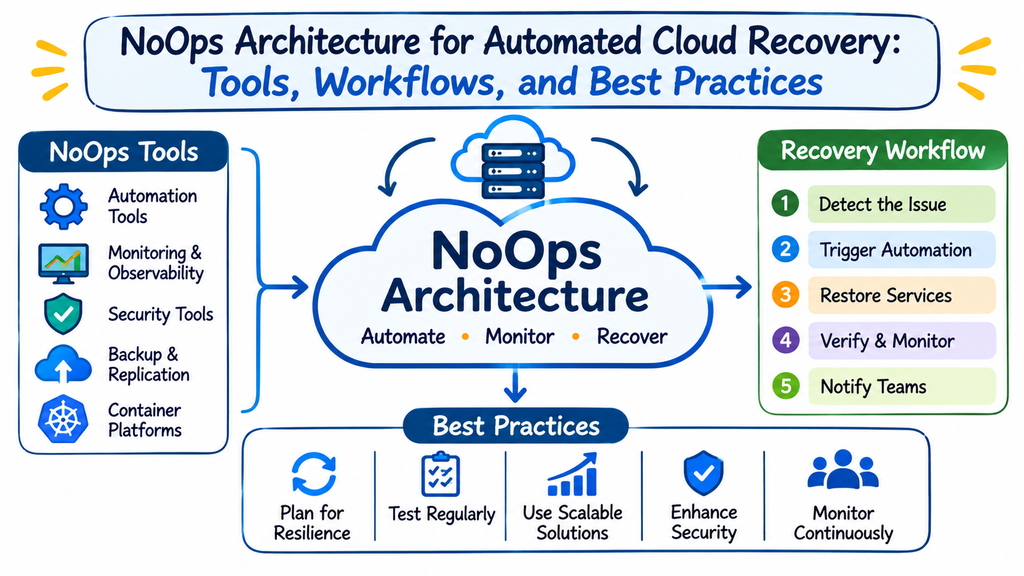
NoOps offers a different way to manage such tasks. It uses automation, managed cloud services, and software-based controls. These methods help teams reduce repetitive work and improve system recovery.
Automated cloud recovery plays an important role in this approach. It helps systems detect known problems and follow planned actions. Kubernetes, Terraform, GitOps, and observability tools support this process. Professionals can explore these concepts through NoOpsSchool, which focuses on NoOps education, certification, and consulting.
The Role of Automated Recovery in NoOps
Cloud infrastructure includes many connected services. Each service can face different problems. A server may stop responding. An application may use too much memory. A deployment may also introduce an incorrect setting.
Traditional teams often depend on engineers to fix these issues. This process can increase response time during busy periods.
Automated recovery uses predefined rules to handle selected failures. It checks system conditions and starts suitable actions.
For example, a container may stop working. Kubernetes can restart it when its liveness check fails. A monitoring system can also alert engineers when failures continue.
The main goal is to reduce routine manual work. It does not remove human responsibility.
Key Capabilities of Automated Recovery
A well-designed recovery system can support several tasks:
- Detect application and infrastructure failures.
- Restart selected unhealthy services.
- Replace failed application instances.
- Adjust resources when workloads increase.
- Restore approved configuration settings.
- Send alerts when recovery actions fail.
- Record important system events.
Teams should define clear limits for each action. This helps prevent unsafe automation.
Building Blocks of a NoOps Cloud Environment
NoOps depends on several technologies that work together. Each technology supports a different part of cloud management.
Cloud-Native Infrastructure
Cloud-native systems use services designed for cloud environments. These services support flexible resources and automated management.
Managed databases, container platforms, and serverless services can reduce infrastructure maintenance. Cloud providers handle selected tasks behind these services.
Teams still need to manage permissions, network settings, backups, and costs.
Infrastructure as Code
Infrastructure as Code helps engineers manage cloud resources through files. Instead of creating every resource manually, they define settings in code.
Terraform supports this approach. Teams can use it to manage networks, compute resources, storage, and other infrastructure.
For example, an engineering team can define a development environment through Terraform. It can review and reuse the same configuration across projects.
This method improves consistency and change tracking.
Container Management
Docker helps teams package applications into containers. Kubernetes manages container workloads across a cluster.
Kubernetes can restart failed containers and maintain the desired number of application replicas.
It also supports health checks:
- Startup probes check whether an application has started.
- Liveness probes detect applications that need a restart.
- Readiness probes control when applications receive traffic.
Engineers must configure these checks according to application behavior.
Git-Based Infrastructure Control
GitOps connects infrastructure management with version control.
Teams store approved configurations in Git. A controller checks whether the live environment matches the desired configuration.
Argo CD supports this workflow for Kubernetes applications. Teams can configure it to correct certain changes outside the approved process.
This makes configuration management more controlled and repeatable.
Choosing the Right Automation Tools
Tool selection depends on infrastructure size, cloud platforms, and technical needs.
| Automation Tool | Main Function | Practical Application |
|---|---|---|
| Terraform | Infrastructure provisioning | Create and update cloud resources |
| Docker | Container packaging | Package applications consistently |
| Kubernetes | Container orchestration | Manage application workloads |
| Argo CD | GitOps delivery | Sync approved configurations |
| Prometheus | Metrics collection | Track resource and application health |
| Grafana | Data visualization | Display monitoring information |
| Ansible | Configuration management | Run repeatable infrastructure tasks |
| CloudWatch | AWS monitoring | Monitor AWS resources and services |
Teams should avoid adding tools without a clear purpose. Too many overlapping systems can increase maintenance work.
Designing a Reliable Automated Recovery Workflow
A good recovery workflow starts with a clear problem. Teams should understand the cause before choosing an automated response.
Map the Most Common Failures
Start by reviewing infrastructure incidents and support records.
Look for repeated problems, such as:
- Failed application containers.
- Unavailable web services.
- High CPU or memory usage.
- Incorrect deployment settings.
- Missing cloud resources.
- Temporary network failures.
Rank these problems by frequency and impact. Begin with failures that have clear recovery steps.
Define Safe Recovery Rules
Every automated action needs a clear condition.
For example, a team may restart an application after several failed health checks. It should also set a limit on repeated restarts.
Useful recovery rules include:
- Check application health before taking action.
- Retry failed requests within safe limits.
- Restart workloads only under defined conditions.
- Notify engineers after repeated failures.
- Stop automation when a problem needs human review.
These rules help control automated behavior.
Connect Infrastructure with Monitoring
Monitoring systems collect information about applications and resources. They help engineers detect unusual behavior.
Teams should monitor important signals:
- CPU and memory use.
- Application response time.
- Request failure rates.
- Container restart counts.
- Database connections.
- Network traffic.
Prometheus can collect metrics. Grafana can display dashboards. Alerting rules can notify teams when conditions exceed defined limits.
Add Controlled Recovery Actions
Connect selected alerts with recovery workflows.
For example, an application may stop responding. A health check detects the problem. Kubernetes restarts the affected container.
If the restart does not help, the system should alert an engineer. It should not repeat the same action forever.
Review Every Recovery Event
Automation should produce useful records. Engineers need to know what happened and why.
Track important details:
- Failure detection time.
- Recovery action.
- Action result.
- Number of retries.
- Service recovery time.
- Related application errors.
These records help teams improve their automation rules.
Practical Cloud Automation Scenarios
Realistic examples show how different tools support NoOps architecture.
Recovering an Unhealthy Kubernetes Application
A company runs an online application inside Kubernetes. One container stops responding to health checks.
Kubernetes detects the issue through its configured liveness probe. It restarts the container according to the workload policy.
The application may recover without manual intervention. If the failure continues, monitoring tools alert the engineering team.
This process handles known container failures. It does not repair every application defect.
Managing Infrastructure Changes Through Terraform
An organization manages several cloud environments. Manual resource creation causes configuration differences.
The team creates reusable Terraform configurations. Engineers review changes before applying them.
The team can then use approved configurations across development and production environments.
This improves infrastructure consistency. It also helps engineers track resource changes.
Restoring Kubernetes Settings Through GitOps
A team stores application configurations in Git. Someone changes a live setting without following the approved process.
Argo CD detects the difference between Git and the live environment. Its configured self-healing policy can restore the desired configuration.
Engineers can review the repository history to understand approved changes.
Scaling Applications During Traffic Spikes
An online service receives more requests than usual. Its application Pods begin using more CPU.
Kubernetes Horizontal Pod Autoscaling checks configured metrics. It increases the number of replicas when conditions meet the scaling rules.
The service can handle more requests when the cluster has enough capacity. Teams must also monitor databases and connected services.
Improving Security and Reliability in NoOps Systems
Automation can increase the speed of infrastructure changes. But poor controls can also create serious problems.
Security must remain part of every automation workflow.
Control Access to Automation Tools
Give each automation service only the permissions it needs. Avoid using shared administrator accounts.
Use role-based access control where suitable. Review service permissions regularly.
Protect Infrastructure Configurations
Store infrastructure code in controlled repositories. Require reviews for important changes.
Protect secrets such as passwords and API tokens. Use suitable secret management services instead of placing sensitive values in source code.
Set Recovery Limits
Do not allow every failure to trigger unlimited actions.
Set retry limits and recovery timeouts. Add approval steps for actions that may affect important services.
Test Failure Scenarios
Run controlled tests before production rollout.
Check how the system responds to container failures, network problems, and deployment errors.
Review every test result. Improve the recovery process when the system behaves unexpectedly.
Common Problems During NoOps Adoption
Organizations may face several challenges while introducing automation.
| Challenge | Possible Impact | Practical Response |
|---|---|---|
| Poor monitoring rules | Missed or unnecessary alerts | Review thresholds and test alerts |
| Incorrect automation | Repeated failures | Add retry limits and recovery checks |
| Weak access control | Security exposure | Apply least-privilege permissions |
| Configuration drift | Different environment settings | Use GitOps and infrastructure code |
| Uncontrolled scaling | Higher cloud costs | Set resource limits and budgets |
| Missing documentation | Difficult troubleshooting | Record workflows and recovery steps |
Teams should address these problems early. Careful planning helps prevent automation from creating more work.
Building NoOps Skills for Cloud Automation
Professionals need practical technical skills to design and manage automated infrastructure.
Important learning areas include:
- Cloud platforms and resource management.
- Linux administration and scripting.
- Terraform and Infrastructure as Code.
- Docker and Kubernetes.
- GitOps and configuration control.
- CI/CD pipeline automation.
- Monitoring and observability.
- Security and access management.
- Incident response and recovery testing.
DevOps Engineers can expand their automation skills. Cloud Architects can learn to design managed infrastructure. Platform Engineers can focus on reusable automation systems.
Practical projects provide valuable experience. Start with a small cloud environment and add recovery features step by step.
A Gradual NoOps Adoption Strategy
Organizations should not automate every operation at once. A planned approach helps teams control risks.
A useful adoption sequence includes:
- Review existing infrastructure and manual tasks.
- Find repeated operational problems.
- Select suitable cloud automation tools.
- Create reusable infrastructure configurations.
- Add health checks and monitoring.
- Automate low-risk recovery actions.
- Apply access and security controls.
- Test recovery workflows outside production.
- Review costs and system performance.
- Expand automation after successful testing.
Each stage should have clear goals. Teams should measure results before moving forward.
How NoOpsSchool Supports Technical Development
NoOps adoption requires knowledge of cloud platforms, automation, and modern infrastructure design.
NoOpsSchool provides learning and professional services in these areas. Its relevant offerings include NoOps training courses, practical learning resources, and certification paths.
Professionals can explore learning areas such as:
- NoOps Engineer Certification.
- NoOps Architect Certification.
- NoOps Manager Certification.
- Infrastructure automation.
- Kubernetes and Docker.
- Terraform and GitOps.
- Cloud-native computing.
Organizations can also explore consulting services for automation strategy, cloud modernization, and infrastructure planning.
The right learning path depends on existing skills and business needs. Practical projects should remain a key part of professional development.
Frequently Asked Questions
What does automated cloud recovery mean?
Automated cloud recovery uses predefined rules to respond to known infrastructure problems. Systems can restart failed containers, restore approved configurations, or adjust resources. These actions reduce routine manual work. Engineers still investigate complex failures and review important recovery decisions.
How does NoOps improve cloud infrastructure management?
NoOps reduces repetitive operational work through automation and managed cloud services. It helps teams automate infrastructure provisioning, deployment, monitoring, and selected recovery tasks. Engineers can focus more on architecture, security, and reliability. NoOps does not remove the need for technical oversight.
Can Kubernetes recover failed applications automatically?
Kubernetes can restart containers when configured liveness checks fail. It can also maintain the desired number of application replicas. However, it cannot fix every application bug or database failure. Engineers must configure health checks and recovery policies carefully.
Why do teams use Terraform for NoOps?
Terraform helps teams define and manage infrastructure through code. It supports repeatable resource creation and controlled changes. Teams can review configurations before applying them. This reduces manual setup work and helps maintain consistency across cloud environments.
What is the purpose of GitOps in cloud automation?
GitOps uses Git as the source of approved configuration. Controllers compare the desired state with the live environment. They can apply approved updates and correct certain unwanted changes. This approach improves configuration control and makes infrastructure changes easier to track.
Which monitoring tools support self-healing infrastructure?
Prometheus and Grafana are common monitoring tools. Prometheus collects metrics, while Grafana displays dashboards. Cloud platforms also provide monitoring services. Teams can connect alerts with recovery workflows when they define suitable conditions and safe actions.
Does self-healing infrastructure remove the need for engineers?
No. Automation handles selected tasks, but engineers still manage system design, security, and complex incidents. They also review recovery rules and improve infrastructure. Human judgment remains important when automated actions cannot solve a problem safely.
What are the main risks of automated recovery?
Poor recovery rules can create repeated failures or unnecessary restarts. Uncontrolled scaling can also increase cloud costs. Weak access controls may expose infrastructure to security risks. Teams should test automation, set limits, and review recovery records regularly.
What should beginners learn before starting NoOps?
Beginners should understand Linux, networking, and cloud computing first. They can then learn Docker, Kubernetes, Terraform, and GitOps. Basic scripting and monitoring knowledge also help. Small practical projects provide a useful way to understand automation.
How can organizations start adopting NoOps?
Organizations should begin by reviewing manual operational tasks. They can automate simple and repeatable workflows first. Next, they should add monitoring, security controls, and recovery testing. A gradual approach helps teams understand risks before expanding automation.
Final Thoughts
Cloud automation can change how organizations manage infrastructure. Self-healing workflows help systems respond to known problems without constant manual action. Kubernetes, Terraform, GitOps, and monitoring tools provide useful building blocks.
Still, reliable automation needs careful design. Teams must test recovery actions and control security permissions. They must also review costs and system behavior.
Start with small improvements and build from real operational needs. Develop practical skills before automating critical services. A well-planned NoOps approach can reduce routine work while keeping people in control.